
Free Online Air Hockey
Play air hockey online: aim, bank, defend
Take the green mallet on the left and shoot for the goal on the right. Bank the puck off a rail to get around a block, then get back before the return. Free to play with mouse or touch, with no download or sign-up.
This table plays against AI. For a match with a friend, choose Two-Player to share one device, or Play Online to use separate devices and send an invite link.
Move the mallet to hit the puck
Mouse: select Start game, then move the cursor across the table. Your mallet follows and strikes the puck on contact. No holding a button or clicking to shoot.
Touch: press on the left half and drag. The mallet follows your movement without jumping under your finger. Release to stop; lift and start another drag when you run out of room.
Pause: use Pause game or press Space. Resume game continues play. Find difficulty and target score in the desktop side panel, or under Settings on mobile.
Start slow, then step up the pace
Beginner reacts more slowly and leaves more room for error. Standard, the default, picks up the pace. Expert moves faster, reads rebounds more accurately and looks for bank shots when you block the direct route.
Try Beginner and 5 points first. Get a few returns in a row, then try Standard and the default 7 points. Choose 11 for a longer match; the point target does not change the AI.
One point per goal. First to the target wins.
Defend the left goal; score in the right. A right-side goal gives you one point; a left-side goal gives the AI one, regardless of the last touch. First to the selected 5, 7 or 11 points wins. No two-point lead is required.
Mallets stay on their own halves. The puck can cross the center line and rebound off any rail outside the goal openings. A rail hit does not score.
Serves are automatic. The opening puck travels toward you. After a goal, it resets on the side that conceded, waits briefly, then moves toward that side's goal. Use the delay to prepare your return.
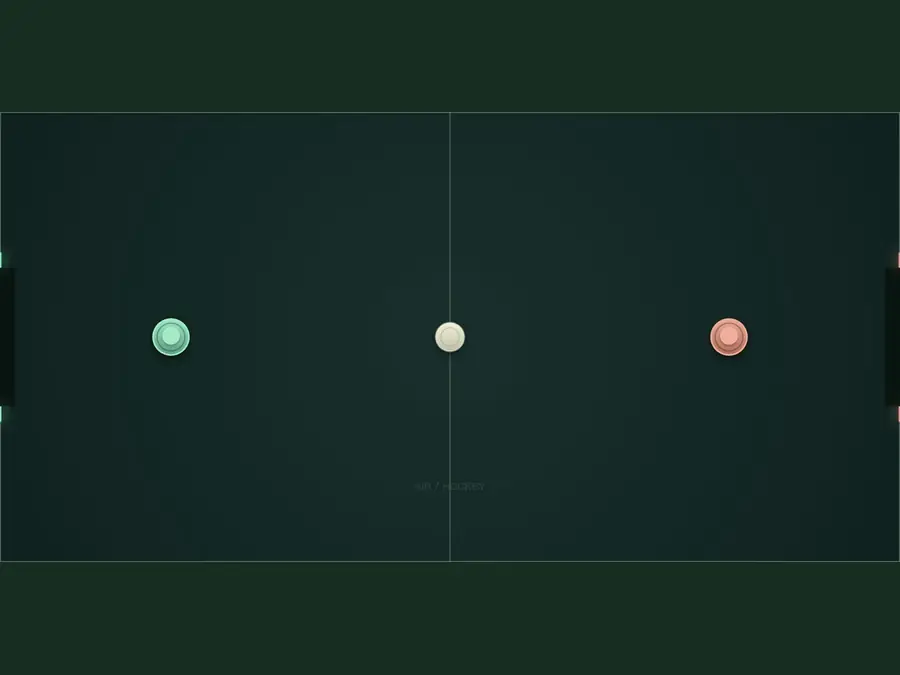
Hit straight, then try a slight angle
The opening setup lines up your mallet and the puck. Move right to meet the serve head-on. Moving into the puck adds speed; get clean contact before trying a harder shot.
For an upward shot, meet the puck from below and left; for a downward shot, from above and left. Adjust slightly: a glancing hit sends it sideways rather than toward goal.
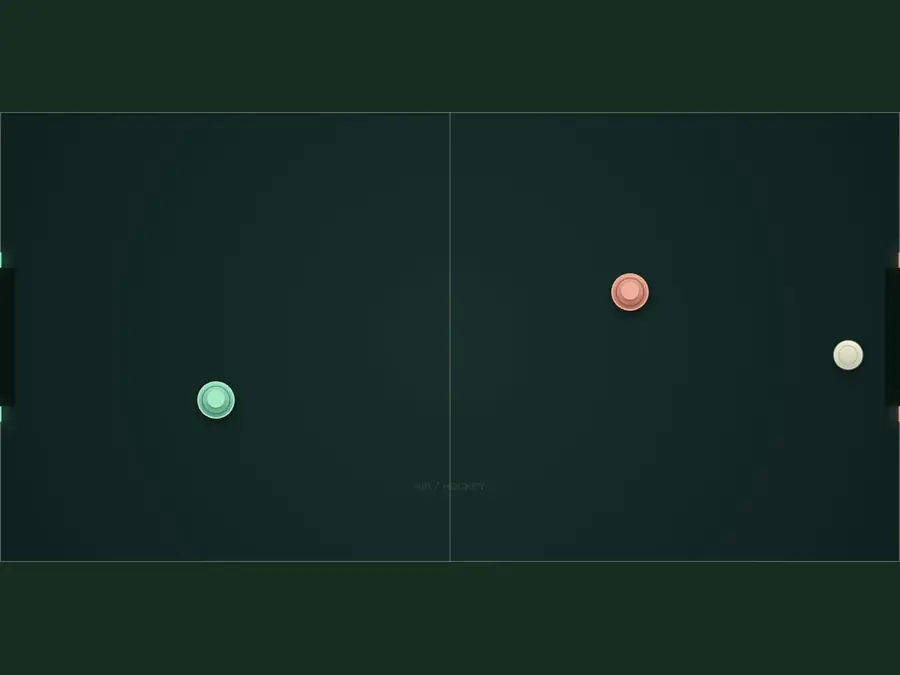
Get back while your shot is still traveling
Here the puck is near the right goal and your mallet is below center. Get back in front of your own goal's midpoint, ready to cover a high or low return.
Leave room between your mallet and the end rail to move forward and intercept. Watch where the return will reach your half after any rail bounce. Block that path instead of chasing the puck.
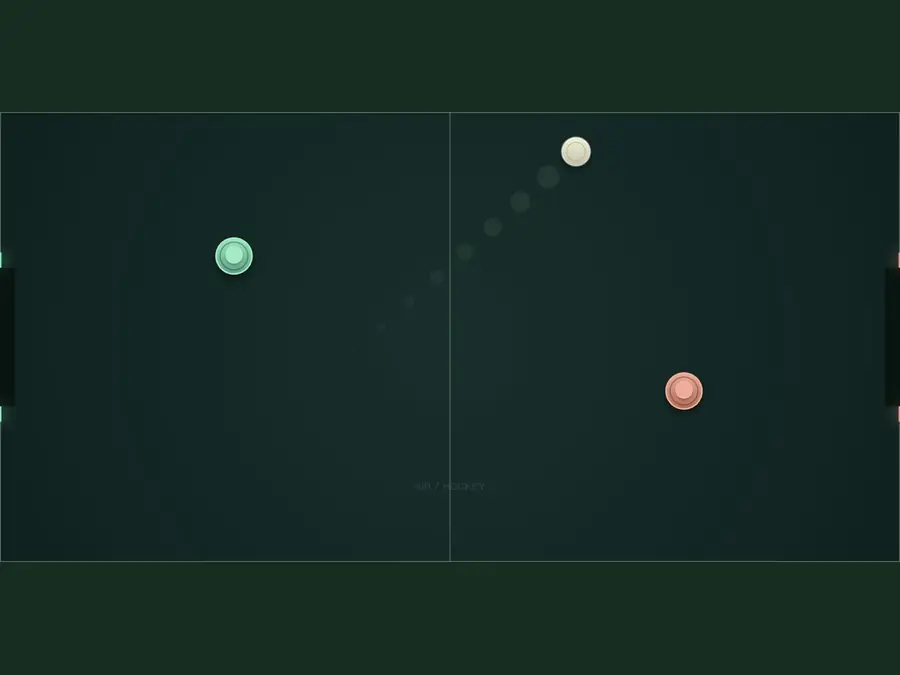
Use one bounce to get around a block
The puck is heading up and right. At the upper rail, it bounces down and right, approaching the goal from a new angle. Try this when the AI blocks a straight shot.
Practice from the same position with one upper-rail bounce. If the rebound passes above the right goal, aim more steeply upward; if below, use a shallower angle. Adjust a little at a time. Repeated bounces give the AI longer to recover.
Frequently asked questions
Is it free? Do I need to download anything or sign up?
It is free. There is no separate app to download and no account to create. Choose a difficulty and select Start game.
Can I play with a friend?
Yes. Two-Player lets you share one device. In Play Online, each player uses their own device: share a private room's invite link, or create a public room and wait for an opponent.
Why does my mallet lag behind the cursor or ignore a touch?
The mallet has a speed limit and stops at the center line. Touch input must start on the left half; only one finger controls this AI table. If it does not move at all, check that play has started or resumed.
How do I change the difficulty or target score?
They lock during a game, including pauses, and unlock when it ends. To change them sooner, confirm New game. This clears the score, hits, time and goal log, but keeps your settings. Copy the record first to keep it.
Why does the game pause when I switch tabs?
This AI table pauses when you switch tabs, the window loses focus or you open Settings on mobile. Your score stays where it was. Select Resume game when you return.
Does the puck trail predict shots? Can I turn it off?
The trail shows the puck's recent path, not its next bounce. Turn it off with Puck trail in the panel. Sound has a separate toggle below the table. Focus mode gives the table more space by hiding the navigation and page content; Exit focus brings them back.
Can I save my score or resume after refreshing?
Copy saves your score, settings, hits, playing time and goals as clipboard text. Pauses do not count toward playing time. Refreshing or closing the page loses the game; the copied record cannot restore it. Check clipboard permissions if copying fails.
Can I add air hockey to my Home Screen?
Open the site menu and use its install icon for browser-specific instructions. Its label may be Install app, Add to Home Screen or Add to Dock. The shortcut opens the table next time; it does not save a game or enable offline play.